Saturday, January 26, 2013

HoverCam: Portable Scanner and Document Viewer In One


The HoverCam is a collapsible document camera and scanner all in one portable package. The HoverCam first slides out of the base and then swings out from the arm. The HoverCam T5 has a five megapixel camera which allows the HoverCam to capture crisp scans of documents up to 11" X 14". The HoverCam plugs into a Mac or PC using USB and does not require any external power. To begin using the HoverCam, launch the HoverCam Flex software which is included with the HoverCam T5. The HoverCam Flex software gives you the option to start scanning, capture a video, or show and annotate a document on a projector. Click read more below to learn more.


Scanning:

In order to scan to a PDF, JPEG, or other file type, place the document under the camera and position it properly then snap the picture. If you have more than one page you can use an included alignment bumper to line up each page more quickly. The HoverCam takes pictures very quickly with almost no time lag. Scanning documents with the HoverCam seems to be more difficult than scanning documents with a flatbed scanner. A scanner requires less aliment and adjustments but at the HoverCam is much more portable than a flatbed scanner. A scanner with a multi-page feeder would also be much faster than the HoverCam at scanning multi-page documents. The document quality is similar to the quality of a scanner which is impressive for a device of this size. From my experience the HoverCam has similar quality and speed compared to a portable scanner. I would not recommend students rely on the HoverCam to scan documents during class unless it is at a work-station during study hall . Using any scanner during class while the teacher is lecturing or other students are working with the print material can be distracting and time consuming. Scanning of books is one of the strong suits of the HoverCam. You can just put the book under the HoverCam, align in correctly, and then scan the first two pages then just flip the page to scan the next two pages. With a flatbed scanner it is much more difficult because you must lift the book after each page. The HoverCam includes built in LED lights for use in dimly lit rooms. The HoverCam also includes a mat with tactile alignment ridges for the blind and visually impaired.

Video:

Video recording is not the HoverCam's strong suit. The video seemed very choppy and the audio from the built in microphone was muffled. When moving a hand across the screen the hand would have a ghost effect.  

Document Camera:

The HoverCam also has document camera functionality. It allows teachers or presenters to display documents to a group. The built in LED lights provide good image quality even in dimly light rooms. When showing a document you can add annotations including text and underlines. The HoverCam also includes a Kensington-compatible security slot so you can lock it up when you're not using it.

Kurzweil Compatibility:

Kurzweil 3000 users can use the HoverCam as a scanner to directly scan documents into Kurzweil. Watch the above video to learn more about HoverCam compatibility with Kurzweil. 

Pricing/Availability:

The HoverCam T3 costs $219 and the HoverCam T5 costs $279 from thehovercam.com. The HoverCam T3 includes a 3 megapixel camera while the T5 includes a 5 megapixel camera. The T5 includes some other features that are not available on the less expensive T3. Visit thehovercam.com to learn more. 

Who Can Benefit?

The HoverCam could be a good tool for students who use Kurzweil and does not already have a scanner. With the HoverCam you can portably scan documents which is impossible with a flatbed scanner. The HoverCam is similar to a portable scanner in terms of speed and quality. For teachers, the HoverCam is a good document camera with annotation options.

Sample Document Scans:

Using HoverCam:


Using Scanner Pro for iPhone:


This product was provide to reviewer for purpose of review and was returned
Read More

Sunday, December 30, 2012

Top 10 Posts of 2012

Read More

Favorite Assistive Technology Apps & Products of 2012


As 2012 comes to a close I decided to make a run down of my favorite assistive technology apps and products that I have been using this year. This list is in no particular order.

Click read more view the list.


The Sky WiFi Smartpen is easy to use and seamless. It has a built in recorder and camera that, when used with specialized paper, syncs audio and written notes in the cloud. To read the Sky WiFi Smartpen review click here.


iPad mini is a great tablet because of its size, app selection, and accessibility. The lower price point makes it even more compelling. Most of all iPad mini runs all the apps that the full size iPad does and has accessibility features second to none. Click here to read more about the iPad mini.


While iOS 6 many have been short on mainstream features it has several useful accessibility features including Guided Access, highlighting with Speak Selection, Siri improvements, and VoiceOver improvements. Click here to learn more about iOS 6.


This update included great new voice search feature that I found to be better and faster than Siri. Click here to learn more about the Google Search App for iOS.


This app has a really nice interface and good scan quality which made it my favorite scanning app of 2012. Click here to learn more.


Prizmo is hands down the best OCR app for iPhone that I have used. Just take a picture of a document and it will read it to you in a matter of seconds. Click here to download or learn more about Prizmo.


A great reader of Bookshare books that allows you to read your books portably without a computer. Bookshare is an online accessible library avalible to qualified people. Click here to download or learn more about Read2Go.


Kurzweil isn't new to 2012 but it is a program I use everday. It helps me tremendously and it deserves a spot on this list. Click here to learn more about Kurzweil 3000.


Good app for listening to Learning Ally Audio books. The free app is available for all iOS devices. I would like to see the app include new features such as background audio in 2013. Click here to learn more.


Read More

PaperPort Notes App Adds OCR Functionality


Nuance's PaperPort Notes app for iPad received a major update. The highlight of the update is the ability to take a picture of text to add the text to your notes. The Optical Charactor Recongition (OCR) feature is slower than other competing apps but is accurate. The improved cameras on the newest iPads allow OCR to work well. To learn about the other features of the free PaperPort Notes app click here. Click here to download the app.

Click read more below to view screenshots of PaperPort Notes.


Read More

Thursday, December 27, 2012

Google Play Books Adds Read Aloud Feature


Google Play Books is the Google's ebookstore and companion reader apps. The Android reader app was recently updated to include a text-to-speech read aloud feature. Click here to download the free app for Android. The text-to-speech voice is a little above average but gets the job done. The read aloud feature works with most books in the Google Play store. If you have an Android device be sure to check this app out.

Click read more below to view screenshots of Google Play Books.


Read More

Friday, November 30, 2012

iTunes 11 Feature Helps Visually Impaired Redeem Gift Cards


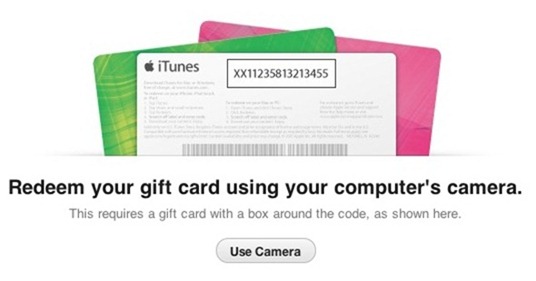
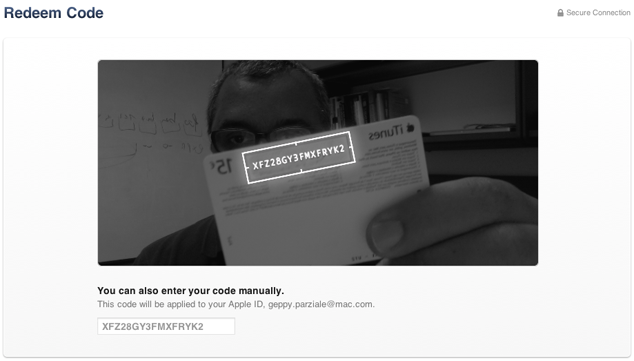
A feature in Apple's iTunes 11 allows you to scan a gift card code using your computer's camera. The feature is particularly intriguing for the blind, visually impaired and for dyslexics. While it may be inconvenient for most people to type the 16 digit code, it is impossible for users who are blind or visually impaired, and can be a struggle for some dyslexics. To use the feature position the gift card in front of the computer's camera. For people with visual impairments VoiceOver, Apple's built in screen reader on your Mac will help you frame the card in the picture. Then iTunes recognizes the code and credits the money to your iTunes account. This feature makes it possible for the blind and visually impaired to easily and independently redeem iTunes gift cards. Maybe this cool scanning feature will make its way to iOS in the near future.

Click read more below to view pictures of the scanning feature in action.


Read More

Tuesday, November 27, 2012

Nook App for iOS Updated to Support VoiceOver and Zoom


Great news, the Nook app for iPhone, iPad, and iPod Touch is now accessible to the blind, visually impaired and people with print disabilities. The updated app now supports VoiceOver and Zoom. VoiceOver and Zoom are built in accessibility features in iOS. To learn more about VoiceOver click here. With VoiceOver you can have the book read aloud using text-to-speech. Oddly enough the update makes the Nook app more accessible than current Nooks. Serious kudos to Barns & Noble's for making their app accessible. To download the app for free click here.

Click read more below to view more screenshots.


Read More